
Most people still measure body temperature with the thermometer device and record it as notes and for outdoor temperatures they use weather forecasting apps. But did you know that there are many thermometer apps that you can use on your iPhone? These temperature apps help you easily measure your body and the room temperature as well. As you all know during the pandemic situation, many places required to measure the temperature before entering into the premises, and people also kept track of their and their close one’s temperature so the temperature plays a very useful role in our life. But it is not easy to carry a thermometer everywhere we go. So here the temperature apps help measure the temperature of people and the temperature around you so that you can keep track and monitor your temperature with the help of these apps. In this article we are going to tell you the Temperature Apps For IPhone, so read this article carefully to get the complete information.
i Thermometer
The iThermometer app is the leading and most popular thermometer app. It is the user’s preferred choice because of its upgraded interface which has got a significant facelift that shows a wonderful and intuitive display. This thermometer app is not just limited to thermometer checks but also charts and logs repeated temperature measurements and graphs the continuation of fever. So this helps the patient or a parent to share the progression of fever information with their physician. You can also set the app to collect temperature regularly even for periods in between as short as 4 seconds. Furthermore, this app also conducts a professional analysis of the body temperature through its association collaboration with Boston Children’s hospital and thus you should try this app out for monitoring your temperature. Moreover, it is free to use.
Real Thermometer
Many people think that a thermometer is only needed to measure the temperature of the body. But if you want to know the temperature outside or at home then this app will be a perfect choice. Isn’t it interesting that in an app you can do both? So, the Real thermometer is one of the easiest to use apps that tells you ambient temperatures so that you can know what the temperature is around you. Furthermore, this app also measures your body temperature. This app can also be used for checking the temperatures of different regions by plugging in the zip code so that you can get the local weather forecast.
also read : – Zerodha Kite App Review
Finger Body Temperature
Finger body temperature is one free temperature app that simply works by opening it and placing your finger on your phone to get a temperature readout. And this is the main reason that most people love this app as it collects a body temperature very easily and intuitively. But due to its simple-to-use interface, the app also serves as a prank app that allows for the read-out of the temperature to be manipulated, and thus you or your friends can jokingly convince others that either your or theirs fever is at the roof.
Smart temp
Smart temp is another free temperature app that allows users to easily get the temperature on their iPhone. The best thing about this app which makes it unique from other apps is that every family member can have their profile of tracking temperature on this app so that this app makes it easy for them to distinguish between whose temperature readings are being tracked. Furthermore, another useful feature about this app is that it has a reminder feature so that if the user needs any assistance remembering when to take temperature next then they will be notified or alarmed.
iCelsius
i Celsius is another free temperature app that converts your iPhone into a full-on and multi-use thermometer. This app records data of the temperature and graphs it so that it can be analyzed by the user or their physician. It helps you measure your body temperature for devices with a temperature sensor that informs you whether the temperature is too high or too low with indicators. Furthermore, one of the features which makes it unique from other apps is that it can also be used for figuring out the temperature of other household appliances and cooking ingredients like tea, coffee, and wine as well.
Thermo
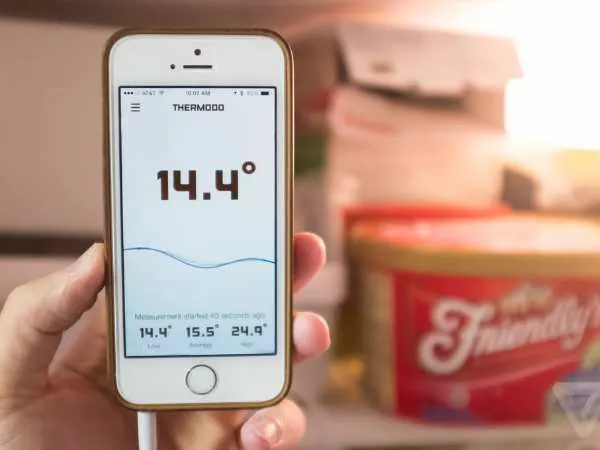
Thermo is one of the easy-to-use apps that you can use to monitor the temperature of different locations. This app allows you to search for temperatures of different locations dependent on geographical location either in Fahrenheit or Celsius. To use this app, you just have to simply share your location and it will quickly respond to the temperature of the region. Furthermore, it can also read the body temperature for devices that have body temperature measuring capability so with the help of this app you can do both. So overall, you should try this app to see the temperature around you.
Thermometer & Hygrometer
If you are looking for an app that can measure the ambient temperature as well as humidity levels and wind speed then this app will be the perfect choice for you which you can use to do both. Thermometer & Hygrometer app allows you to get temperature levels of your local area as well as the percentage level of humidity in both Fahrenheit and Celsius. This is the reason that most people prefer this app as it can measure temperature and humidity. Furthermore, the app provides the temperature based on geographical location so it will not display your room temperature as the data on this app is based on locally available weather reporting.
Thermometer ++
Thermometer ++ is one of the simple and efficient temperature apps which display local temperature readouts. This app tells you temperature based on geographical location as well as it will tell your humidity and atmospheric pressure. Furthermore, you can get your temperature readout in both Fahrenheit and Celsius. You can use this app as it is very popular and it is compatible with both Android and iOS platforms. The best thing is it is preferred by most people as it has already garnered more than 5 million downloads so you should also definitely try it out.
Easy BBQ
Some people need a thermometer that is specifically based on cooking. So for them, a BBQ would be the best choice. This app makes the collection of food temperature simple for the users and it monitors the degrees in real-time. Furthermore, the app has preset temperatures for different food items and it exhibits the ideal temperature for cooking many different types of meat so that the user will be informed when the ideal temperature is reached while cooking. And this is how you can cook your food perfectly be at the right temperature.
also read : – Why Schooling Matters from International Schools to Senior Secondary
Digital Thermometer
As we all know, some thermometers or apps can be hard to read as they run the temperature on a degree line or on a scale that can’t be understood easily. So if you are also looking for apps to see temperature easily then the digital thermometer is the best option. This app is a modern yet simple approach as the output of all the returned temperatures in this app is in an easy form to understand the digital readouts. This app is capable of measuring ambient temperature and it can also inform you of the outside temperature based on your geographical location from indoors. Furthermore, it delivers you a lot of information like altitude, humidity, wind speed, and even geographical longitude and latitude.
Thermometer
The thermometer is one of the efficient temperature apps which is lightweight as it takes only 2 MB of your memory. The best thing about this app which makes it unique from other apps is that it can read the indoor temperature even if you are offline while other apps always require an internet connection. But for outdoor temperature readings, you have to be connected with the internet as the app requires the internet to tell the outdoor temperatures. This app usually works as a widget for the iPhone as you can drill down into the details that appear on your phone. These are the main reasons people use it as it is lightweight and it also provides additional information and works as a widget for the iPhone.
Do These Temperature Apps Really Work?
Now, you might be wondering — do these temperature apps actually work or are they just clever weather widgets disguised as thermometers? Well, here’s the truth. Most iPhone temperature apps don’t directly measure body temperature because iPhones don’t have a built-in temperature sensor that can read human body heat. Instead, these apps collect temperature data through indirect methods — by accessing your device’s internal sensors, GPS location, or connected smart accessories.
For example, apps like iCelsius or Smart Temp can provide real temperature readings if you connect them to an external device such as a digital probe or Bluetooth thermometer. These accessories send precise data straight to the app, which then analyzes and displays it in real time. On the other hand, apps like Thermometer & Hygrometer or Thermometer++ rely on online weather databases to show you the ambient temperature and humidity of your area.
So yes — these apps do work, but how accurately they measure temperature depends on the method they use. If you’re measuring environmental temperature, they’re generally reliable. But if you’re checking body temperature, you’ll need to connect an external sensor to get accurate results.
How Do These Temperature Apps Work?
The working mechanism of iPhone temperature apps is actually pretty fascinating. Let’s break it down step by step in simple terms:
- Sensor Data Reading
Some apps use your phone’s internal sensors like the battery sensor and barometer to estimate ambient temperature. Since your phone’s components heat up while running, the app applies algorithms to filter out the device’s heat and show a near-accurate reading of the surrounding air temperature. - Location-Based Temperature Detection
Many apps (like Thermo and Real Thermometer) use your GPS location to pull real-time temperature data from trusted weather APIs. That’s why you’ll often see these apps ask for location permission before showing you the readings. - External Device Connectivity
Advanced apps such as iCelsius or Smart Temp work with external temperature sensors via Bluetooth or Lightning connector. These sensors can detect body, liquid, or object temperature precisely and send it directly to the app. It’s the same principle used in medical-grade digital thermometers, just made more convenient through your phone. - Cloud Data and Analytics
A few smart apps even store your temperature readings over time to help you analyze patterns — for instance, tracking fever progress or environmental changes. Apps like iThermometer can generate graphs and reports that you can share with your doctor. - Humidity and Air Pressure Integration
Some apps also measure air pressure, humidity, and wind speed using barometric data or by syncing with online meteorological databases. This gives you a more complete environmental overview, not just a single temperature value.
In short, these apps combine your iPhone’s internal sensors, location data, and sometimes external devices to provide accurate, easy-to-read temperature measurements — both for your body and your surroundings.
Interesting Facts About Temperature Apps for iPhone
- No iPhone has an actual thermometer built in.
That’s right. Not even the latest iPhone models can directly measure body temperature without external hardware. These apps simply use clever algorithms and external data sources. - Bluetooth thermometers changed the game.
Devices like Kinsa Smart Thermometer and iCelsius Probe can sync with your iPhone, turning it into a full medical-grade temperature monitor. - Some apps can detect fever trends.
Apps like Smart Temp store daily readings and plot them into charts, helping parents monitor a child’s fever over time. - Ambient readings aren’t 100% exact indoors.
Because your phone naturally warms up while in use, apps like Thermometer++ might show slightly higher indoor readings. Keeping your phone idle for a few minutes before checking improves accuracy. - Cooking apps use temperature sensors too!
Apps like Easy BBQ use smart meat thermometers connected via Bluetooth — perfect for grilling at the exact temperature needed.
FAQs About Temperature Apps for iPhone
Q1. Can my iPhone really measure my body temperature?
Not directly. iPhones don’t have built-in thermal sensors for body temperature. However, by pairing with devices like iCelsius or Kinsa, your iPhone can display highly accurate temperature readings.
Q2. Which temperature app is best for medical use?
iThermometer and Smart Temp are great for monitoring body temperature, especially when paired with approved digital sensors. They even log data and generate reports for healthcare reference.
Q3. Are temperature apps accurate for room or outdoor temperatures?
Yes, for environmental readings, apps like Thermometer++ and Real Thermometer pull real-time data from reliable weather sources. Their accuracy depends on your GPS and the data provider’s precision.
Q4. Can these apps be used offline?
Some apps like Thermometer and Thermometer++ allow offline functionality for indoor readings by using built-in sensors. However, most weather-based apps need an active Internet connection for updated data.
Q5. Do temperature apps show humidity and pressure too?
Yes! Apps such as Thermometer & Hygrometer also display humidity levels, atmospheric pressure, and wind speed, giving you more environmental insight.
The Final Words
While all the thermometer apps perform the same functions that are measuring the temperature of a person in either Fahrenheit or Celsius, some of the apps have additional features which might be useful for you. So the above-mentioned apps are our best recommendations for iPhone users to use on their phone as these apps will provide additional features than only being a temperature app. Furthermore, with the help of these apps, you do not have to carry a thermometer everywhere. So overall choose the best app among the above-mentioned apps which you liked the most as per your need and preference and have a better experience of monitoring your temperature and temperature of geographical locations around you. In last, I hope this article is sufficient enough to clarify the information about Temperature Apps For IPhone.